...
Here is a screen shot of the Marauder's Map main page.
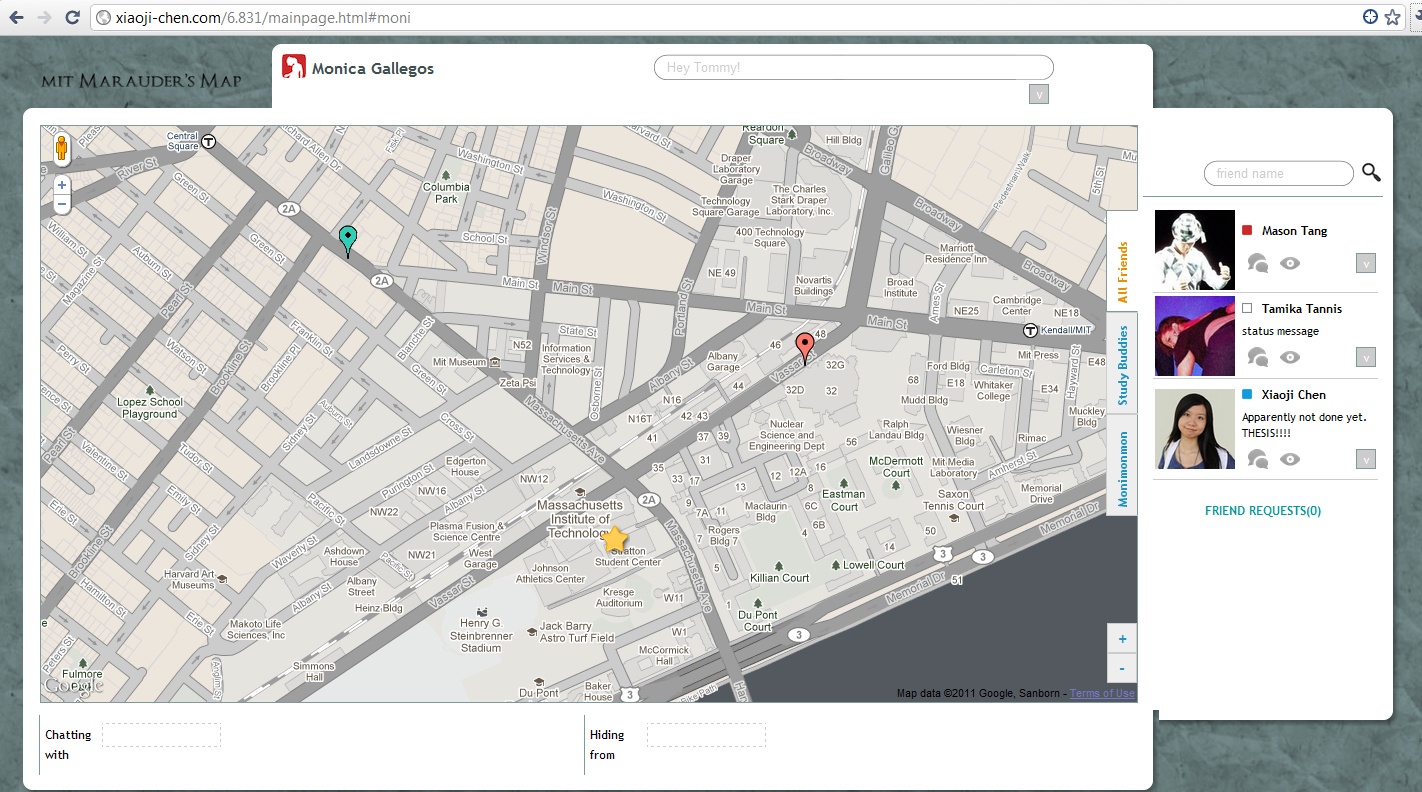
Marauder's Map is a way for users to see where their friends are and what they are up to.
...
this method is simple, clear, and to the point.

IMPLEMENTATION

IMPLEMENTATION
All major functionalities are organized within one page. For implementation and collaboration convenience, we divided the page into several modules. The modules were first developed separately, and then integrated into one layout. The main frame resizes the modules to fit into the size of the browser window.
Each module has its distinct behavior, but actions taken in any of them may have a global influence, as discussed below.
One crucial point of the implementation is to make sure the information displayed in all modules are synced. For example, by clicking on a 'hide from' button in the sidebar friend list, the following views are expected to change: the hidden/shown status icon on the sidebar; the hidden/shown status icon in the map popup window; the tags in the 'hiding from' bottombar. To solve this we use a MVC pattern:

The HTML file contains the layout information and the templates of all dynamic objects (FriendEntry, Tag, …).
There are two types of functions in the scripts: the 'loader' functions retrieve records from the backend and refreshes all visible elements accordingly. For example, the refreshTabs() function takes an array of friends information, make a tab for each group, generate a grind entry object for each friend using the template, attach listeners to its buttons then append it to its tab.
Very few listener functions, upon receiving user actions, activate another object in the view, for example, clicking on a user's name on the sidebar causes the info window in the map to pop up. Other listeners do not alter the views directly. They request the backend to update the database, then dispatch an 'reload' event. They handle user requests such as adding/deleting friends, hiding/unhiding from user, managing groups, updating mood and status message, etc.
This design makes sure that all modules are as independent as possible. However, there is the downside of it: the views are not refreshed until the backend data is updated. When there is a significant delay in getting server response, the user cannot see the effect of his action in time, and gets confused if he has missed the target. This was observed during the demoday in class. This fails the 'feedback' principle in usability.
If we are to improve the implementation, I would cache a copy of the user info/friendship data locally. The listeners should modify this local data and use it to refresh the views. The local data will be synced with the server in the background.
EVALUATION
Method
...
This issue did not affect their ability to figure out what the buttons were for, so it was deemed cosmetic. To alleviate this issue, we could have affordances for those buttons other than a ' + ' and ' - '. For example, the button for adding a group could read ' + Group ' instead of just ' + '.
2. <B>Minor Minor (visibility)</B>: One user initially thought the status text field was for searching.
| Wiki Markup |
|---|
{html}

The statusThe status text field saysfield says "your status message" when it's blank, but once a status message is submitted, there are no other hints what that text field is for.  To To alleviate this issue, there is enough room on the left-hand side of the status bar to include the label "Status: "

 !status.png|border=1!

{quote}

{quote}
                       Room                       Room for a "Status" label on the left
{html} |
| Wiki Markup |
|---|
{html}

{html} |
3. Major (learnability): All three users had issues discovering how to create a group.
Two of the users took significantly longer to complete the task "Create a group called Study Buddies" than any other task, and one user opted to be told how to do it. All three users commented that they thought the ' + ' and ' - ' signs meant that the buttons were meant for zoom functionality on the map. One user also commented that it did not help that the buttons were separated from the group tabs, as opposed to just being right below the last tab. This issue was acknowledged in pilot testing and originally deemed a cosmetic graphic design issue. However, the fact that our test users had significantly more trouble with the task, plus one user having to ask how to complete the task, we now consider this issue a major learnability issue. The solution to this issue remains the same as previously described in our pilot testing results.
REFLECTION
GroupsGroups
