...
Here is a screen shot of the Marauder's Map main page.
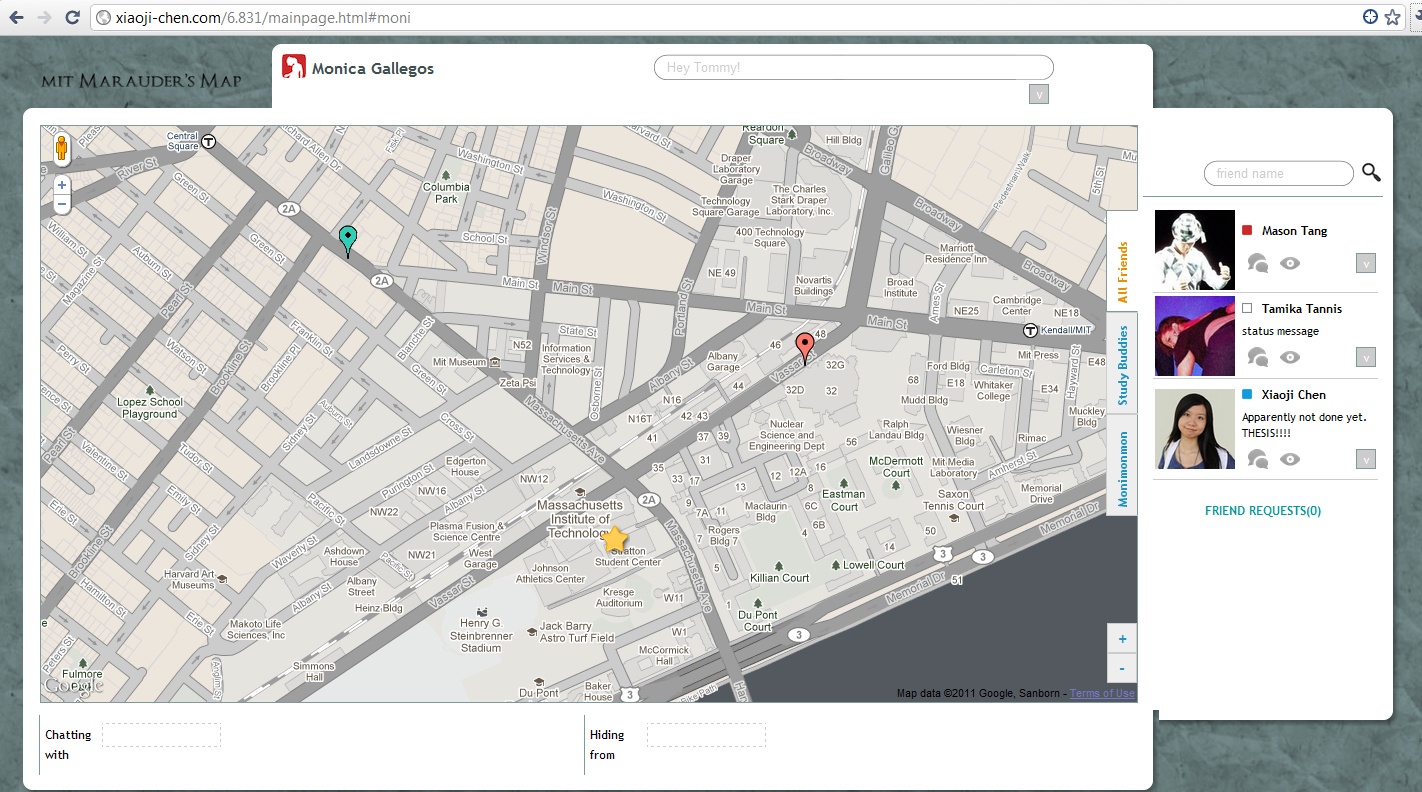

Marauder's Map is a way for users to see where their friends are and what they are up to.
...
2. Minor (visibility): One user initially thought the status text field was for searching.
| Wiki Markup |
|---|
{html}

The status text field says "your status message" when it's blank, but once a status message is submitted, there are no other hints what that text field is for.  To alleviate this issue, there is enough room on the left-hand side of the status bar to include the label "Status: "
{html} |
| Wiki Markup |
|---|
{html}
<BR></BR><BR></BR><BR></BR><BR></BR>
{html} |

Room for a "Status" label on the left
...
When asked why that was their first intuition, two users stated that the placeholder made it look as if they could type in a name. However, when clicking in the "Hiding from" area in the bottom bar, all three users went to click on the "Hide from user" eye next to the designated friend, successfully completing the task without too much hassle. 
The dashed placeholder has the potential to be confused with a text area
...
Two of the users took significantly longer to complete the task "Create a group called Study Buddies" than any other task, and one user opted to be told how to do it. All three users commented that they thought the ' + ' and ' - ' signs meant that the buttons were meant for zoom functionality on the map. One user also commented that it did not help that the buttons were separated from the group tabs, as opposed to just being right below the last tab. This issue was acknowledged in pilot testing and originally deemed a cosmetic graphic design issue. However, the fact that our test users had significantly more trouble with the task, plus one user having to ask how to complete the task, we now consider this issue a major learnability issue. The solution to this issue remains the same as previously described in our pilot testing results.
REFLECTION
GroupsGroups
...
In this project it became apparent that simplicity was the best method. In the beginning, the group tried to jump into fancy drag and drop methods, but these effects ended up making the design more confusing. It was only after countless hours of frustration that the group admitted that drag and drop was not necessary or even useful for the project. In the future, it would be good to keep the importance of design decisions during implementation. Questions such as “how necessary is this feature to the core tasks of the design” and “how does this design decision add to or complicate the user interface?” should be asked.
Simplicity also played a part in designing the project’s main features. The group had to strip the project down to its core features to figure out what to prototype and focus on. Since the project had a simple scope, this part of the process was easier to do well. When designing interfaces in the future, it will be important to remember that it is better to do a simple project very well, than a complicated project poorly.