...
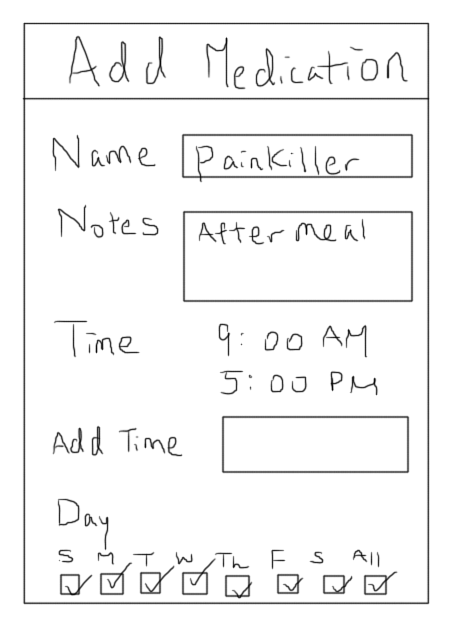
| During her appointment, Mary added all the new medications that the doctor told her to take onto her app right after the doctor gave her the instructions. The app also allows Mary to write down some notes if needed. |
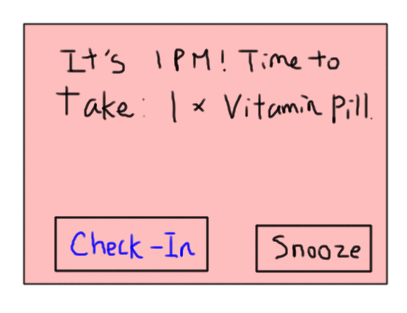
| It's time for Mary to take her daily vitamin. The app sends out an alarm on her mobile device to remind her. Mary can click "check-in" after she finished taking her medicine or click "snooze" if she wants the app to remind her again 10 minutes later. |
| Mary can also look at her medication history and future schedules if she opens the app. There will be check marks next to medicines that she has taken on time. If she missed any of her medicines or the medicines were taken at the wrong time, they will be shown in red font on her med calendar. |
| blahblah |
| blahblah |
Mary can also add medications to her calendar by clicking a time slot and the previous "Add Medication" screen will show up. This is useful if she has taken any over the counter drugs and wants to report to the doctor. | |
| The doctor will have access to all of her patients' medication record on a web application. When she opens the web, there will be notifications on the corner of the screen to indicate abnormal patient activities. |
| The doctor can look more into details of a particular patient. She will see all of the patient's medications history in a calendar. She can click into a particular day to see the patient's progress for that day. Dates marked with red indicate that the patient has incorrectly taken or missed his/her medication for that day. If the doctor clicks the "Message Patient" button, she will be able to send the patient a message that will show up on the patient's mobile app. |


Design 2Design 2

Design 3