Inspired by her friend Yvonne’s creations, Zelda decides that she too wants to pick up sewing. Unfortunately, she does not know where to start, and Yvonne is too busy to teach her, so Zelda is mostly on her own. Luckily, Yvonne directs her to our site.
Because Zelda wants to learn not just how to do small repairs but also to create things of her own, she wants to start learning how to sew by jumping into a project immediately. She finds that she learns best through having a hands-on project, and she wants to have a finished result to show off.
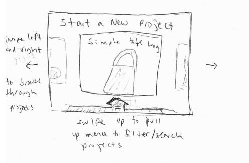
She browses through suggested beginner sewing projects and rejects a pillowcase project because it is too boring and a skirt because it seems like it would take too long to hand sew. Eventually she decides to start making a simple bunny plushie because it is cute.
She reads over the instructions and thinks that they are doable. She gets a list of the required materials (X amount of cloth 1, Y amount of cloth 2, thread, fiberfill/stuffing, needles, etc) and goes out to purchase these materials. For some cloth 2, it turns out she can use an old T-shirt that she no longer wears that is in the pattern that she wants for this bunny.
She then begins to go through the detailed instructions one at a time. First, she prints out the pattern for the bunny and cuts out the individual pieces. Following the instructions on the website, she pins the patterns to the fabric and very carefully cuts out her fabric in the shapes of the pieces and sets them aside in an orderly manner before moving on to her next step.
She has some trouble threading her needle because she is not very experienced at this kind of thing, but she finds a tutorial on how to use a needle threader.
Carefully following instructions she begins to sew the pieces of her plushie together. She isn’t very sure how best to go about sewing, so she refers to some reference material about how to do a basic blanket stitch. She was also very close to sewing her pieces together inside out, but fortunately she was reminded beforehand to make sure the right sides of her fabric are facing inwards before she sews. She makes a few more small mistakes, such as accidentally sewing both sides of an ear together when she only needed to sew one, but she notices her mistake not long after she makes it and is able to fix it by only removing a few stitches. Eventually she finishes up her basic bunny shape.
She wants to customize her bunny by adding button eyes and embroidering her name on its stomach. Because these elements are not part of the main pattern, she finds tutorials on how to sew on decorative buttons and how to do simple embroidery text. For the embroidered text, she finds that she needs embroidery floss, not her normal thread, so she first goes to get some of that before she does this step.
When she is done with her bunny, she decides to show it off by posting a picture of it online and adding notes about its creation process. After she is done, she thinks about the things she liked and didn’t like about the process and wants to find projects that have more of what she liked and less of what she didn’t. She also notices some areas of the project that she had difficulty with.
Because she is thinking of picking up sewing as a long term hobby, she wants to improve on some of the areas that were difficult for her while strengthening her skills in the areas that she is particularly interested in. She inputs all of her preferences and the site recommends a range of potential future projects that align with her interests.
Because sewing is a handcraft, it may not be convenient to have a computer with you to refer to at all times. Something smaller and more portable may be desired. Therefore, one of our designs is for a smaller screen or smartphone-like device.
|
|
|
|
|
|
|
|
|
|
|
|
|
|
Learnability:
The interface itself should be reasonably learnable, as long as the various text buttons are made visible and easy to find and clearly labeled. For the search/filter screen and the additional text description on the working through steps screen, it should be made very clear to the user through some kind of affordance that this can be pulled up by swiping the bottom of the screen upwards. In addition, the buttons along the corners of the working through steps screen may not be clear initially, but should be apparently upon clicking for the first time. The text-to-speech button in particular may be confusing, since people think of it as a volume button, which seems really strange for a sewing screen. This could be remedied perhaps by adding a text label, or switching to a different icon that is more obviously text-to-speech(?). Another idea is to create a brief how-to-use-this-app tutorial when the user first makes an account, that runs through something like this storyboard and goes through these functionalities very briefly.
Efficiency:
Having the buttons in the four corners in the working through the steps screen is efficient due to Fitt's Law. Having autocomplete when searching through patterns and tutorials would also increase efficiency. Because it would be inefficient to go through all of the steps of the project one by one to find where you left off, it is important to have the screen which shows are steps and you can click to any one of them to get to there, as well as the resume project option in the active projects screen.
Safety: