Design
Our final Sew Together design is a website that helps people who are new at sewing find easy projects with step-by-step tutorials that are all in one place. The two main parts of Sew Together are the project search, which helps users find a project suited to their needs, and the project instructions themselves.
|
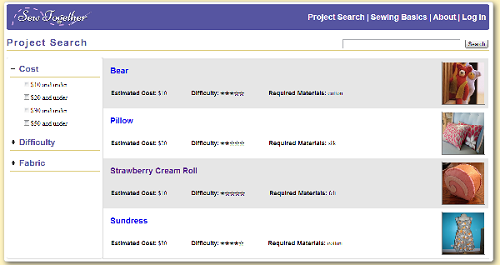
The project search page allows the user to search through the project tutorials that are available on the site and filter them by relevant criteria, such as the estimated cost of the project and the difficulty.
While initially considering our design of the project, we had thought about allowing users to also upload their own projects to the site, which would solve a problem of not having enough variety. After all, a beginning sewer will want a project that is not only easy but also personally fulfilling. After some debilitation, however, we decided not to allow for user-generated projects for two reasons. First of all, our intended user group does not cover the more experienced users who would be the ones uploading their own projects. Secondly, it would be too difficult to ensure that user-uploaded tutorials meet the level of beginner-friendliness that we want to maintain. |

|
Each project tutorial has its own subsection, which consists of an overview page and a series of instructions, broken down step by step.
The overview page contains a picture of the finished project, a text description of the project, and a list of materials needed for the project. In order to help users gather what they need for the project, we help users find where to buy materials by providing a link to a Yelp page that lists neary fabric and craft stores based on the user's location.
|
|
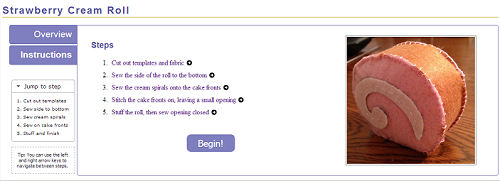
Each step in the instructions has its own page, which breaks down the task required for the overall sewing projects into smaller steps that are more manageable for a beginning sewer. Before seeing any of the individual tasks, an overview instructions page is show, so users can look over all of the steps involved in the project before beginning.
Clicking on any of the overview steps lets the user jump directly to that step, rather than requiring them to click through the steps one by one. Navigation between steps is also possible by using the keyboard only, which may be easier for users who are in the middle of sewing something and have less freedom of movement with their hands
In response to heuristic evaluations, we also added a smaller, condensed version of the steps list to the side of the page, which also appears on each individual step's page as well. With this, users can jump to any step without returning to this instructions overview page. This mini-navigation section is usually collapsed but can be opened if the user needs it, so that even for a project that has a large number of steps, it will not clutter up the page with excess noise. |
High-Level Implementation
When we translated our code from pure front-end to a backend supported system we did not move all of our code (especially because we focused on the front end).
The search for projects and sewing help topics uses front end javascript. The project search terms for those pages and the various variables are stored in javascript. We do not allow users to upload projects, so this solution works for us for now. User accounts are backed by a backend.
When a person clicks to save a project the step after the current is saved. When a user later checks the project page if the current step is less than the saved step they see a checked off symbol.
If a user is logged in they can add notes. Notes record what section of what project they're in and who made them among others.
Pages that users are not allowed to access have been blocked off from the back end (for example a list of all users).
Evaluation
Reflection