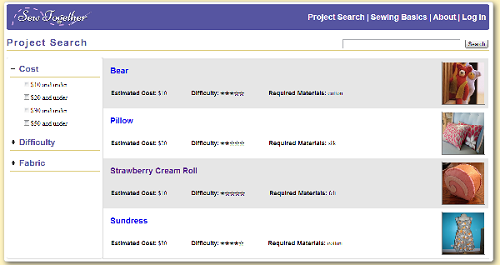
The project search page allows the user to search through the project tutorials that are available on the site and filter them by relevant criteria, such as the estimated cost of the project and the difficulty. The appearance of the filters on the side went through some changes after the heuristic evaluation-- we added the checkboxes to increase visibility and make it easier for users to understand how they work (OR, not AND).
For this implementation, we have one representative project tutorial, "Strawberry Cream Roll". Were the site to be fully implemented, we would provide several more projects. While initially considering our design, we had thought about allowing users to also upload their own projects to the site, which would solve a problem of not having enough variety. After all, a beginning sewer will want a project that is not only easy but also personally fulfilling. After some debilitation, however, we decided not to allow for user-generated projects for two reasons. First of all, our intended user group does not cover the more experienced users who would be the ones uploading their own projects. Secondly, it would be too difficult to ensure that user-uploaded tutorials meet the level of beginner-friendliness that we want to maintain.

Each project tutorial has its own subsection, which consists of an overview page and a series of instructions, broken down step by step. The overview page contains a picture of the finished project, a text description of the project, and a list of materials needed for the project. In order to help users gather what they need for the project, we help users find where to buy materials by providing a link to a Yelp page that lists nearby fabric and craft stores based on the user's location.
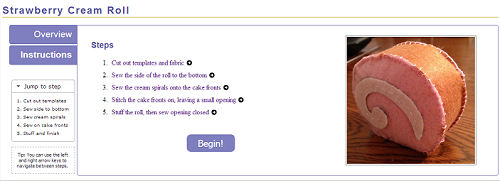
Each step in the instructions has its own page, which breaks down the task required for the overall sewing projects into smaller steps that are more manageable for a beginning sewer. Before seeing any of the individual tasks, an summary instructions page is show, so users can look over all of the steps involved in the project before beginning. Clicking on any of the steps here lets the user jump directly to that step, rather than requiring them to click through the steps one by one. Navigation between steps is also possible by using the keyboard only, which may be easier for users who are in the middle of sewing something and have less freedom of movement with their hands
In response to heuristic evaluations, we also added a smaller, condensed version of the steps list to the side of the page, which also appears on each individual step's page as well. With this, users can jump to any step without returning to this instructions overview page. This mini-navigation section is usually collapsed but can be opened if the user needs it, so that even for a project that has a large number of steps, it will not clutter up the page with excess noise.

Another comment from the heuristic evaluations was that there should be a way for the user to return to the step that they left off on. We added this feature to our final design. If the user is logged in, they can keep track of currently active and completed projects. This is visible on the user's dashboard. By clicking on the project in the dashboard, they can jump to where they left off. When a user completes a step, they can quickly check it off before moving to the next step. This features are meant to increase efficiency for users, but because they are not fundamental to our purpose of helping beginners to sewing, we decided that a user could choose not to create an account and log in. In that case, they can still freely access the project tutorials, but their progress will not be tracked.

If a new user is unfamiliar with a particular technique or is likely to need help in some area while on a particular step, they can click on the glossary/sewing basic terms that are linked on each page. A dialog box will pop up that contains explanations, definitions, or suggestions and a relevant video link. We decided to use a dialog box because it is much more efficient for users to find the information they need without having to navigate to a new page (or tab) and back again.
The Sewing Basics section of the site functions as an index of all of the glossary/help entries. If a user wishes, for example, to look up how to do the running stitch, they can do so directly from the Sewing Basics section of the site without having to navigate to a project tutorial step that contains a reference to the running stitch. The dialog box that appears is the same for both methods of looking the term up, however.
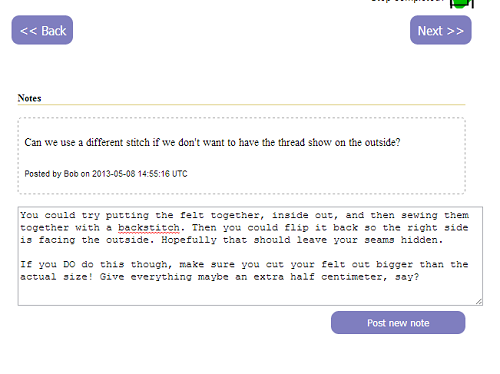
The final major component of our design is the ability to allow users to add notes to the tutorial pages. This is to address the user task of "catching and correcting mistakes made while sewing". There is no optimal way to do this, of course, so we went through a series of ideas before we finally settled on this one.
Our paper prototype contained the ambitious and overly optimistic idea of organizing videochats for users based around a specific project, allowing them to help each other catch and correct mistakes as they sew. We found that these "video sew-alongs" were not intuitive for users and veered too far from our initial goal of helping users learn to sew through a project.
For our computer prototype, we toyed with the idea of letting users create chatrooms called "Lounges" (as an analogy for real-world sewing lounges). However, for our final implementation, we decided against this for two reasons: 1. implementation would be too difficult given our time constraints and the lesser importance of this feature, and 2. chatting (as opposed to video/voice chatting) requires too much typing than is really practical for someone who is sewing.
Hence, we decided to allow users to leave comments on tutorial pages, as a way for them to annotate our tutorials with any additional notes, tips, or warnings that they feel could be helpful for future users. In this way, users would be able to see mistakes that other users may have made on any given step and avoid it themselves, or find any helpful fixes that other users provide. Currently, the functionality is quite basic. An improvement that could be made is to allow for the upvoting of comments, reddit-style. This would ensure that more helpful notes are more visible to users.