Overview
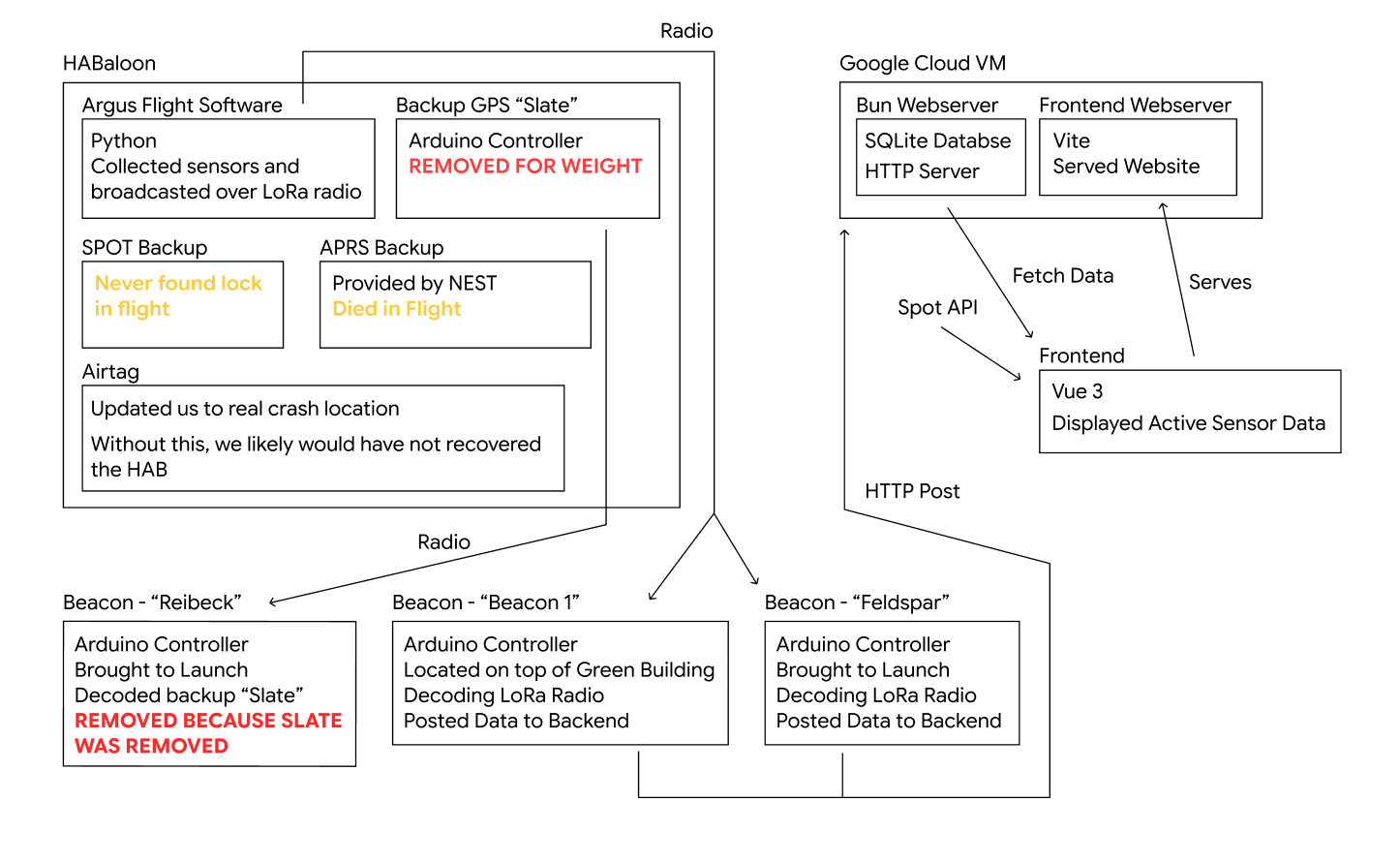
Argus Flight Software
The flight software that was loaded onto the main ARGUS board was written in micro python. The code can be found here: https://github.com/MITSatellite-Team/FSW-mainboard. It uses CMU's build scripts.
Building to the Board
Before building the flight software to the ARGUS board, you must be connected to the board over USB-C and the board's file system must be named "ARGUS".
Additionally, if the build script is not finding the board, you might have to adjust the board path in the build_tools/build.py file. For example I had to change the path to
BOARD_PATH = f"/run/media/{username}/ARGUS"
because that is where Arch decided to mount the board.
To build and move the flight software to the ARGUS board, run:
./run.sh
Debugging the Board
To view the stdout stream from the board (where python print is displayed) and restart the board's software I used tio https://github.com/tio/tio/. You can also use minicom, but I had issues on my computer getting minicom to work. Run tio with the path to the device:
tio /dev/ttyACM0
In this case /dev/ttyACM0 is the path to the device. This is likely different on your computer, so consult Google to see how to find the correct path.
Once you've connected properly with tio, you should see debug output. You can stop the flight software with CTRL+C, and then restart it with CTRL+D.
Scripts
We can run temporary python scripts on the board for testing specific functionality. First, we need to move the script to the board by copying the file to the root directory of the board's file system while still connected to the board. Once the script is on the board, we can use tio to execute the script and view the stdout stream (where python print is displayed).
- Make sure tio is open and connected to the board
- Stop any board software with CTRL+C
- Once in the shell, run
exec(open("NAME_OF_FILE.py").read()Main Flight Software
flight/main.py is the what runs when the board boots up. We modified this to collect data and then transmit the data on loop. Most of the sensors were connected over an I2C line that was soldered where the solar panel connections on the ARGUS board were. The component that weren't on the I2C line were the IMU, GPS, and LoRa. Some important notes for next time:
- Calibrate the IMU ahead of time, so that we can get accurate accelerometer readings
- GPS can take 5-10 minutes to achieve a lock once it's in proper conditions. The GPS must be outside and in direct sight line of the sky. When testing I was not able to get the GPS to position lock through a window, although it was able to detect time information through the window.
Sensor data was supposed to be saved to an SD card. We were not able to get the SD card reader on board to work, so we hooked up an I2C SD card mount. It broke on landing and we were unable to recover the data on it. I think it's a wise policy to require that we stream absolutely everything over radio, and only have backup storage on the HAB as a last resort.
The packet structure emitted by the LoRa radio was designed such that every field encoded a valid boolean so that if a sensor failed, we could tell in our data.