...
Sketch | Storyboard | Learnability | Efficiency | Safety |
|---|---|---|---|---|
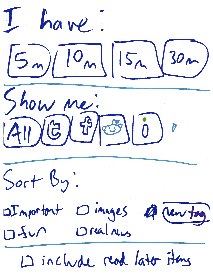
Initial sketch: | To use this filtering interface for our above scenario, Bob would have to mark all of the programming-related posts from Google+ manually and in advance with a tag (like "cool code" or something). If Hubbub could infer this pattern, the design would match our scenario. (sorry we forgot to draw a "search" or "go" button at the bottom, but there should be one there). | This interface is very easy to use. There are only items and check boxes, so Bob can easily try out some of them to see what they do if he's not sure. | This is extremely inefficient, because it only filters on things you've already tagged, aside from what sources to include. Thus Bob has to tag everything he wants to see before he can properly filter for them. | If Bob accidentally filters on the wrong thing, he will have to start this process all over again. |

...
Sketch | Storyboard | Learnability | Efficiency | Safety |
|---|---|---|---|---|
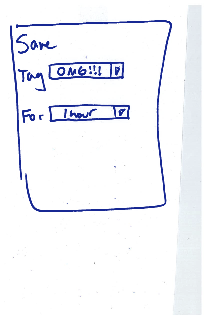
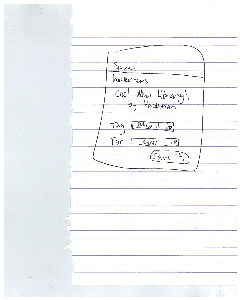
Initial sketch: | This is an example of a menu that would appear after hitting a save button on the page. Here, Bob's previously created/used "save" tags are listed in the first drop-down menu. Since bob has categorized code-related items before, he will already have a "code-related" tag of some kind in the list. This would just be a special tag that makes sure items don't get deleted. For example, if we add options for the user to delete items that have been around for a long time (month or something), items with the save tags would be ignored. | It's pretty clear what is being saved. But Bob may not realize how to create a new save tag with this design. He would have to explore the drop-down menus to see what they do. | This is pretty efficient for saving a single item. Bob could save an item in 1 tap on his phone using the default menu values. As the list of save tags grows, we can allow scrolling/arranging options for the save tags to speed up the search for the correct tag. | The item Bob is trying to save is displayed to make sure he's saving the right thing. |
...
Sketch | Storyboard | Learnability | Efficiency | Safety |
|---|---|---|---|---|
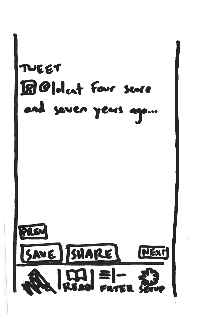
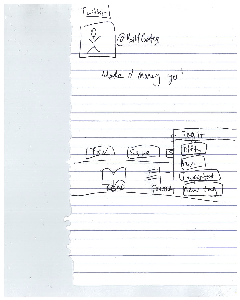
| With this interface, Bob This interface displays a single item at a time, filling the screen. Bob is brought immediately to the first item in his feed. He goes from one item to another using the next and previous buttons. | Bob may confuse the intent of the read later tag with other tags if we include it in the tag menu. Thus we will probably have to add another button. The issue with this is that there are already 8 buttons at the bottom of the screen. This may make learning how to use the interface more difficult for new users, even if the buttons seem straight-forward in use. Next and Previous are familiar affordances from websites that Bob can use to learn how to navigate through his items. | When | If Bob realizes he accidentally skipped an entry he was looking for, he will have to hit the "Prev" several times to get back to the correct entry. However updating tags will be easy. There is no "undo" button for any of the interfaces. |

...