...
| Panel |
|---|
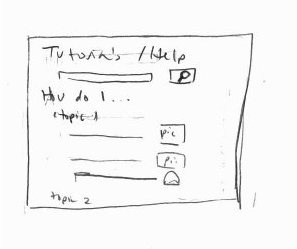
The pull up menu for searching/filtering through projects.This lets you filter the projects to browse through by kind of project (plushie, clothing item, etc), skill level, etc. You can also search through the projects by name. There should be autocomplete that pops up as you type it. |

| Panel |
|---|
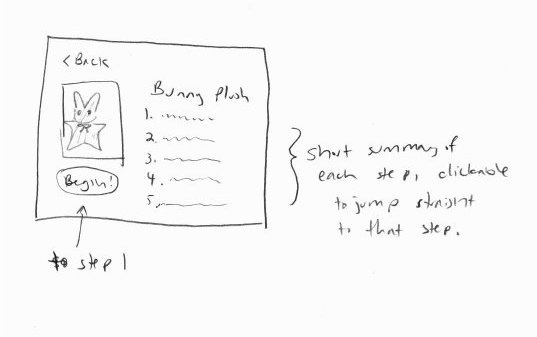
When you decide to start a project, you see this screen. It is a list of the steps of the project, with a short version of the instructions ("Print out pattern pieces", "Cut out pattern pieces", "Sew piece X and Y together"). You can click on each step to go directly to that step for easier navigation. There is also a very large and obvious "BEGIN" button that will start you on step 1. |
| Panel |
|---|
When you are actually doing one of your steps, it looks something like this. It is primary a screen that has a big illustration of the step and the short instruction for that step in large text, to make it easier to see clearly on a small screen. Detailed text instructions can be pulled up if you swipe the bottom upwards, as well as a video link for this step, if it is available. Because it can be difficult to use your hands or keep watching the screen while you are busy sewing, you can press the button on the upper right to have the detailed instructions read aloud to you. There is also a very prominent (and red, not shown in this sketch) alert button on the top right of the screen. Tapping on it will pull up common mistakes and warnings for this step. It may also flash briefly the first time you navigate to this step as an additional reminder. The bottom right contains tips and additional help. If you tap on that, it can provide links to relevant tutorials. For example, in the sewing step illustrated in this sketch, it may lead you to a tutorial on how to sew a back stitch. |

| Panel |
|---|
You can put down your work at any time. Your progress will be saved. You can have several active projects at once, which you can go through to see your progress through them and resume. From this screen you can also access the "start a new project" browsing screen. You can also go look at just the basic tutorials, instead of a specific project as well. |

| Panel |
|---|
|