 Image Added Image Added
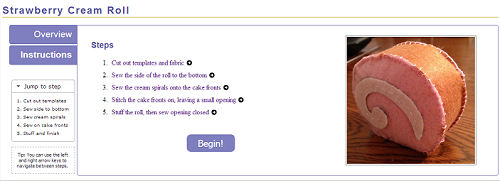
| Each step in the instructions has its own page, which breaks down the task required for the overall sewing projects into smaller steps that are more manageable for a beginning sewer. Before seeing any of the individual tasks, an overview instructions page is show, so users can look over all of the steps involved in the project before beginning.
Clicking on any of the overview steps lets the user jump directly to that step, rather than requiring them to click through the steps one by one. Navigation between steps is also possible by using the keyboard only, which may be easier for users who are in the middle of sewing something and have less freedom of movement with their hands
In response to heuristic evaluations, we also added a smaller, condensed version of the steps list to the side of the page, which also appears on each individual step's page as well. With this, users can jump to any step without returning to this instructions overview page. This mini-navigation section is usually collapsed but can be opened if the user needs it, so that even for a project that has a large number of steps, it will not clutter up the page with excess noise. |
