...
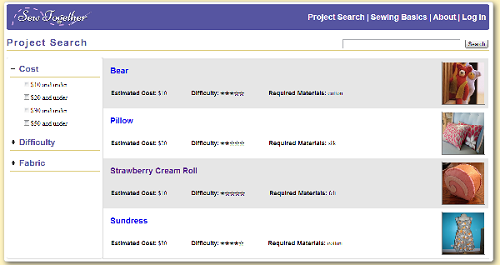
| The project search page allows the user to search through the project tutorials that are available on the site and filter them by relevant criteria, such as the estimated cost of the project and the difficulty. The appearance of the filters on the side went through some changes after the heuristic evaluation-- we added the checkboxes to increase visibility and make it easier for users to understand how they work (OR, not AND). |
| Each project tutorial has its own subsection, which consists of an overview page and a series of instructions, broken down step by step. The overview page contains a picture of the finished project, a text description of the project, and a list of materials needed for the project. In order to help users gather what they need for the project, we help users find where to buy materials by providing a link to a Yelp page that lists nearby fabric and craft stores based on the user's location. |
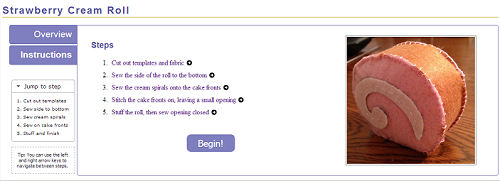
| Each step in the instructions has its own page, which breaks down the task required for the overall sewing projects into smaller steps that are more manageable for a beginning sewer. Before seeing any of the individual tasks, an summary instructions page is show, so users can look over all of the steps involved in the project before beginning. Clicking on any of the steps here lets the user jump directly to that step, rather than requiring them to click through the steps one by one. Navigation between steps is also possible by using the keyboard only, which may be easier for users who are in the middle of sewing something and have less freedom of movement with their hands |
| Another comment from the heuristic evaluations was that there should be a way for the user to return to the step that they left off on. We added this feature to our final design. If the user is logged in, they can keep track of currently active and completed projects. This is visible on the user's dashboard. By clicking on the project in the dashboard, they can jump to where they left off. When a user completes a step, they can quickly check it off before moving to the next step. This features are meant to increase efficiency for users, but because they are not fundamental to our purpose of helping beginners to sewing, we decided that a user could choose not to create an account and log in. In that case, they can still freely access the project tutorials, but their progress will not be tracked. |
| If a new user is unfamiliar with a particular technique or is likely to need help in some area while on a particular step, they can click on the glossary/sewing basic terms that are linked on each page. A dialog box will pop up that contains explanations, definitions, or suggestions and a relevant video link. We decided to use a dialog box because it is much more efficient for users to find the information they need without having to navigate to a new page (or tab) and back again. |
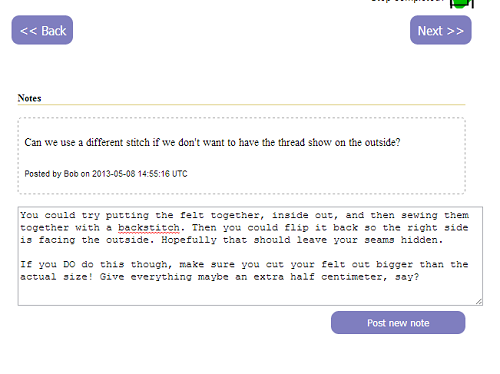
| The final major component of our design is the ability to allow users to add notes to the tutorial pages. This is to address the user task of "catching and correcting mistakes made while sewing". There is no optimal way to do this, of course, so we went through a series of ideas before we finally settled on this one. |



High-Level Implementation
When we translated our code from pure front-end to a backend supported system we did not move all of our code (especially because we focused on the front end).
...