Design
Our final Sew Together design is a website that helps people who are new at sewing find easy projects with step-by-step tutorials that are all in one place. The two main parts of Sew Together are the project search, which helps users find a project suited to their needs, and the step-by-step project tutorials. Other features of the site include keeping track of ongoing projects if you are logged in, allowing users to leave comments/notes on the tutorials themselves, and a glossary/sewing help section that contains help for basic techniques and skills involved in sewing.
|
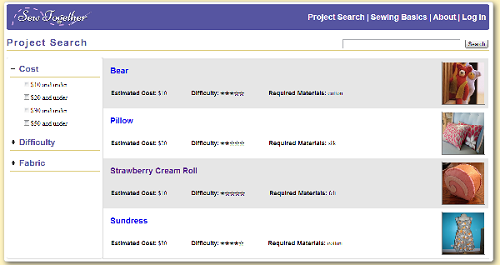
The project search page allows the user to search through the project tutorials that are available on the site and filter them by relevant criteria, such as the estimated cost of the project and the difficulty. The appearance of the filters on the side went through some changes after the heuristic evaluation-- we added the checkboxes to increase visibility and make it easier for users to understand how they work (OR, not AND). |
|
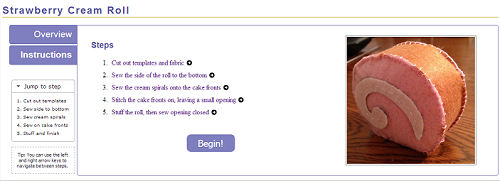
Each project tutorial has its own subsection, which consists of an overview page and a series of instructions, broken down step by step. The overview page contains a picture of the finished project, a text description of the project, and a list of materials needed for the project. In order to help users gather what they need for the project, we help users find where to buy materials by providing a link to a Yelp page that lists nearby fabric and craft stores based on the user's location. |
|
Each step in the instructions has its own page, which breaks down the task required for the overall sewing projects into smaller steps that are more manageable for a beginning sewer. Before seeing any of the individual tasks, an summary instructions page is show, so users can look over all of the steps involved in the project before beginning. Clicking on any of the steps here lets the user jump directly to that step, rather than requiring them to click through the steps one by one. Navigation between steps is also possible by using the keyboard only, which may be easier for users who are in the middle of sewing something and have less freedom of movement with their hands |
|
Another comment from the heuristic evaluations was that there should be a way for the user to return to the step that they left off on. We added this feature to our final design. If the user is logged in, they can keep track of currently active and completed projects. This is visible on the user's dashboard. By clicking on the project in the dashboard, they can jump to where they left off. When a user completes a step, they can quickly check it off before moving to the next step. This features are meant to increase efficiency for users, but because they are not fundamental to our purpose of helping beginners to sewing, we decided that a user could choose not to create an account and log in. In that case, they can still freely access the project tutorials, but their progress will not be tracked. |
|
If a new user is unfamiliar with a particular technique or is likely to need help in some area while on a particular step, they can click on the glossary/sewing basic terms that are linked on each page. A dialog box will pop up that contains explanations, definitions, or suggestions and a relevant video link. We decided to use a dialog box because it is much more efficient for users to find the information they need without having to navigate to a new page (or tab) and back again. |
|
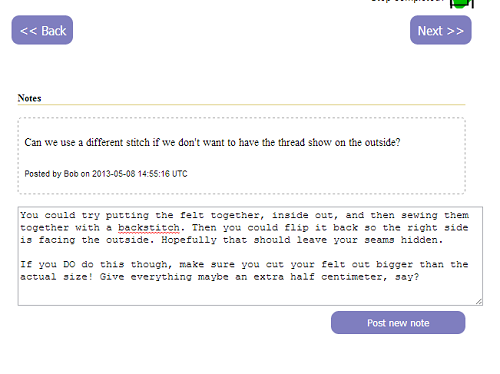
The final major component of our design is the ability to allow users to add notes to the tutorial pages. This is to address the user task of "catching and correcting mistakes made while sewing". There is no optimal way to do this, of course, so we went through a series of ideas before we finally settled on this one. |



High-Level Implementation
When we translated our code from pure front-end to a backend supported system we did not move all of our code (especially because we focused on the front end).
The search for projects and sewing help topics uses front end javascript. The project search terms for those pages and the various variables are stored in javascript. We do not allow users to upload projects, so this solution works for us for now. User accounts are backed by a backend.
When a person clicks to save a project the step after the current is saved. When a user later checks the project page if the current step is less than the saved step they see a checked off symbol.
If a user is logged in they can add notes. Notes record what section of what project they're in and who made them among others.
Pages that users are not allowed to access have been blocked off from the back end (for example a list of all users).
Evaluation
Users:
The three users we found, A, B, and C, are three roommates. User A has experience in doing small projects from DIY kits similar to the Strawberry Cream Roll that we used as our representative project. She is therefore probably more experienced in sewing than our target demographic. User B is the same as Person B from our GR1 analysis. She is very representative of our user population. User C has not done any sewing at all before, but has expressed some interesting in doing a sewing project with the other two in the future. She is somewhat representative of our target user population, in that she is a complete beginner, but not completely representative in that she has no plans to learn how to sew by herself.
Briefing:
Tasks:
Usability Problems:
Problem |
Severity |
Possible Solutions |
|---|---|---|
1) Project search filters are not prominent enough |
Major |
|
*2) *If not logged in, don’t know how to add notes |
Major |
Add message where add note would have been saying that you need to log in |
*3) *People tried to click on search results <div> to go to the project's page |
Major |
Make search results <div> clickable |
*4) *Went to "Instructions" instead of going back or clicking on "Jump to step" sidebar |
Major |
|
5) “You don’t need to sign up” note not visible enough |
Major |
Increase font size, make bold, etc. |
6) Home page should be informative, not just a login page |
Major |
Make logging in unobtrusive on the main site, but give it its own page as well |
*7) *Awkward that dollar options are subsets of each other |
Minor |
Use ranges (from $0-$9, $10-$19, etc.) or radio buttons |
*8) *Difference between instructions and comments was not profound enough |
Minor |
|
*9) *Went to first seen button: "prev" |
Minor |
Make "next" button more prominent |
*10) *Didn’t realize they could use left and right arrow keys to navigate |
Minor |
|
*11) *External links to answers.com were awkward |
Minor |
Include results within page |
*12) *Wanted a zoomer when they clicked on pictures |
Minor |
Show a zoomed-in version of pictures when you click on them |
*13) "*Cheap and easy" task led to picking of bear project |
Cosmetic |
Improve task to say "Cheapest and easiest" |
Reflection
If we were to start the iterative process again, we would probably focus less on the video/chat feature. While we thought it would be cool at the start, but quickly spent too much time on figuring out the details though it was not an essential feature. If we only had the essential features at the beginning we could perhaps have gotten more feedback around our minimum viable product and spent more time building it. I guess it was a high risk, medium reward venture and we had a higher evaluation of the reward. We may have thought it was more useful than it actually was. We were happy with how we evaluated the feedback and went about solving it for the next iteration.